
Writing a useful blog post takes research, planning, and effort. Businesses spend time creating articles that answer questions, explain products, and share valuable information. However, much of this content reaches only people who prefer reading.
Turning blog posts into videos gives businesses another way to share their knowledge. A detailed article can become a YouTube tutorial, product explainer, or educational video.
With AI-assisted editing tools, marketers can organize recordings, improve narration, add captions, and prepare videos without spending hours on every editing task.
The key is following a clear workflow that turns written information into engaging visual stories.
What Is Blog-to-Video Content Repurposing?
Blog-to-video content repurposing means adapting written articles into videos while keeping their original message.
Instead of reading an entire blog aloud, creators select the most useful points and explain them through narration, demonstrations, graphics, and supporting footage.
Businesses can repurpose:
- How-to guides into YouTube tutorials.
- Product articles into demonstration videos.
- Industry insights into educational explainers.
- FAQ pages into YouTube Shorts.
- Case studies into customer success stories.
The goal is to make existing information easier to discover and understand across different platforms.
Why Should Businesses Turn Blog Posts Into Videos?
1. Reach Different Audiences
Some people prefer detailed articles, while others enjoy watching demonstrations.
Repurposing content helps businesses reach both groups without researching entirely new topics.
A single blog can support a YouTube explainer and several shorter social media clips.
Hooks Tech's article on digital marketing trends in 2026 also discusses the growing importance of AI-driven marketing and short-form video content.
2. Explain Complex Topics More Clearly
Videos combine narration, text, and demonstrations to explain information visually.
A website optimization article might describe page speed and mobile design, while a video can show the differences directly.
This makes video particularly useful for tutorials, product demonstrations, and educational marketing.
3. Get More Value From Existing Content
A well-researched blog already contains the foundation for a video script.
Marketing teams can reuse its main ideas, examples, and explanations rather than planning every video from scratch.
This also helps maintain consistent messaging across websites and social channels.
How to Turn a Blog Post Into a YouTube Video?
Step 1: Choose a Suitable Article
Select a blog that answers a specific question or solves a common problem.
Tutorials, educational articles, and product guides are useful starting points because they naturally divide into sections.
Step 2: Prepare a Conversational Script
Identify the most important points and rewrite them into short, natural sentences.
Start with an engaging introduction, explain the main ideas, and finish with a useful takeaway.
Avoid copying the article word for word.
Step 3: Plan the Visuals
Decide which sections need screen recordings, product footage, photographs, or graphics.
A video about social media marketing might include campaign examples, advertising visuals, and simple demonstrations.
Clear instructions are particularly useful when working with AI. Hooks Tech's guide to prompt engineering for digital marketing explains how specific prompts can improve AI-generated results.
Step 4: Record and Organize Footage
Record narration, demonstrations, or talking-head segments.
Group the recordings by topic so the editing process becomes easier.
Step 5: Edit and Review
Remove unnecessary pauses, repeated explanations, and mistakes.
Add captions, background music, and supporting visuals where needed. Check the audio and video before publishing.
Best Video Editing Tools for Repurposing Blog Content
The following tools help creators turn written ideas and recorded material into polished videos.
1. Invideo
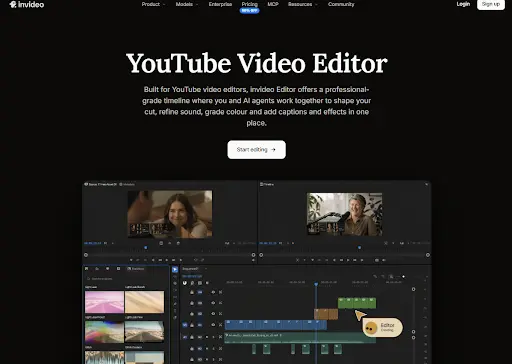
Invideo is a browser-based video editor that helps creators turn recorded footage, narration, images, and scripts into polished YouTube videos. Its professional multitrack timeline combines manual editing controls with AI editing agents, making it useful for businesses repurposing blog content.
With invideo's YouTube Video Editor, creators can upload recordings, arrange clips, trim mistakes, crop footage, adjust playback speed, and combine videos with graphics and music. They can also edit spoken sections through transcripts, generate synchronized captions, add voiceovers, replace backgrounds without a green screen, and stabilize shaky footage.
Its AI agents can organize footage by dialogue, people, objects, and camera angles. They can also remove filler words, silence, and unsuccessful takes to prepare an initial rough cut. Creators can ask the agents to match a reference video's editing style or synchronize cuts with music.
For detailed adjustments, invideo provides keyframe animation, transitions, color grading, audio mixing, and separate tracks for voice, music, and sound effects.
Teams can edit together in real time, share review links, and leave comments at specific moments. The editor supports turning long videos into YouTube Shorts, with export controls reaching up to 4K. Free 1080p exports without a watermark are also available.
These features make invideo a strong choice for creators who want AI assistance while keeping control over their edits.
Best for: YouTubers, businesses, and marketing teams creating polished videos from recorded and written content.
2. Descript
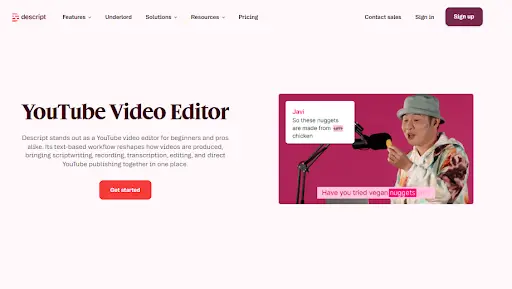
Descript is a video and audio editing platform that makes editing easier by connecting recorded content with a written transcript.
Users can import videos, interviews, or screen recordings, and the platform converts spoken dialogue into editable text. Removing sentences from the transcript also removes the matching video sections.
This is useful for bloggers who record explanations based on existing articles and want to remove unnecessary details without manually searching through footage.
Descript offers tools for removing filler words, improving audio, reducing background noise, and refining narration. Its editing workspace also supports captions, visual layouts, screen recordings, and other video elements.
Creators can review the script alongside the recording, rearrange explanations, and improve the flow of educational content.
For marketing teams, this approach makes it easier to turn long discussions, webinars, and recorded tutorials into shorter YouTube videos.
Best for: Bloggers, educators, and creators producing tutorials, interviews, and narration-heavy videos.
3. VEED
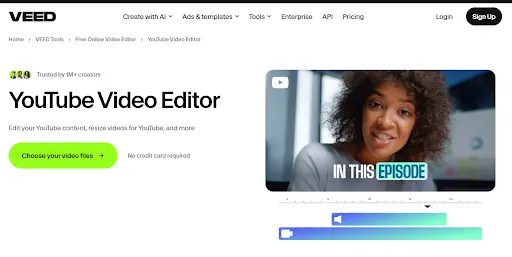
VEED is an online video editor that helps businesses create and improve content directly through a browser.
Users can upload recordings, trim clips, crop footage, add text, and arrange scenes through its editing interface. This makes it suitable for preparing educational videos from blog scripts and recorded demonstrations.
VEED also includes AI-powered features such as automatic subtitles, audio cleanup, filler-word removal, and transcript-based editing.
Creators can adjust captions, add background music, insert supporting visuals, and improve the overall presentation of their videos.
The platform supports resizing videos for different social media channels, helping businesses create shorter versions of their YouTube content for Instagram, TikTok, and other platforms.
Its straightforward editing workflow is useful for marketing teams that need to produce regular content without advanced video editing experience.
Best for: Small businesses, social media managers, and marketers editing YouTube videos and promotional clips.
Tips for Creating Better YouTube Videos From Blogs
Focus on One Main Message
Avoid trying to include every detail from a long article.
Choose the most useful points and explain them clearly.
Keep the Editing Simple
Add transitions, captions, and graphics when they support the story.
Too many effects can distract viewers from the information.
Prioritize Audio Quality
Clear narration helps viewers understand educational content.
Remove background noise and keep music quieter than speech.
Track Video Performance
Monitor audience retention, watch time, engagement, and clicks.
Businesses promoting their videos can also explore Hooks Tech's guide on PPC marketing for small businesses to understand how paid campaigns support lead generation.
Common Mistakes to Avoid
One common mistake is turning an entire blog into a video without adapting the language for narration.
Another is adding unrelated footage simply to make the video more visually appealing.
Creators should also check captions, sound levels, factual accuracy, and pacing before publishing.
A successful video should feel like a complete story rather than a collection of copied paragraphs.
Conclusion
Turning blog posts into YouTube videos helps businesses reach different audiences while getting more value from existing content.
A clear script, relevant visuals, and thoughtful editing can transform written information into engaging video stories.
Tools such as invideo, Descript, and VEED simplify different parts of the editing process. By choosing a workflow that fits their needs, businesses can create useful videos while maintaining quality and consistency.
Looking to build an authoritative, high-converting digital presence? As a dedicated Digital Marketing Company in Madurai serving ambitious brands across Tamil Nadu and India, Hooks Tech blends strategic SEO, paid performance advertising, and modern web engineering to drive measurable business growth.
Frequently Asked Questions
Stay Updated
Get the latest AI video creation playbooks and digital marketing insights delivered straight to your inbox.
Related Playbooks
Scale Your YouTube Marketing
Want to repurpose your top-performing blog articles into high-converting YouTube videos and Shorts?
Get Free Strategy Call